Old PC Deals

  • Subscribe to our RSS feed.
  • Twitter
  • StumbleUpon
  • Reddit
  • Facebook
  • Digg

Thursday, 28 December 2006

Multiple Page PDF's from Revit 9.1? Help says No but I say "Yes, and it's Good"

Posted on 18:46 by Unknown
I can hardly wait for Windows Vista so I won't need this workaround but alas at this point I do.

If you have ever searched Revit's Help system for a way to create multiple page PDF's you were probably upset to find there is no way: One can only print single page PDF's natively from Revit. BTW, This is really slow.

The multiple page document 'printer' is DWF export... So if you are thinking what I am (even if you're not, but you still need multi page PDF's from Revit) then try the following technique. I did and it
not only works great but much faster than printing single page PDF's from Revit; it took substantially less time to DWF export an entire set and then print that to PDF than it took Revit to print a fraction of those same sheets as individual PDF's!!! Propriatorship has it's priveleges...Well now onto business.

1) GoTo FILE / EXPORT DWF (2D or 3D)


2) Make any necessary setups and page choices (Then of course save the DWF)!!!

3) Once you have that new multiple page DWF just open it and print to Acrobat. It will create a multi page PDF (and fast!!!)

If you don't have Adobe Acrobat Writer I suggest you get it.

There are other PDF creators out there and I'm sure a quick internet search will sniff out some free ones but nothing is
ever as as good as the original...Unless, of course it is better.

Happy New Year!!!
-J
Read More
Posted in DWF, Happy New Year, Multiple Page PDF from Revit, PDF, Revit | No comments

Monday, 11 December 2006

Choose Your Views 1: Open Your Mind To The Possible

Posted on 23:25 by Unknown
Well we're back and AU was...well...it was in Vegas so let's leave it at that.
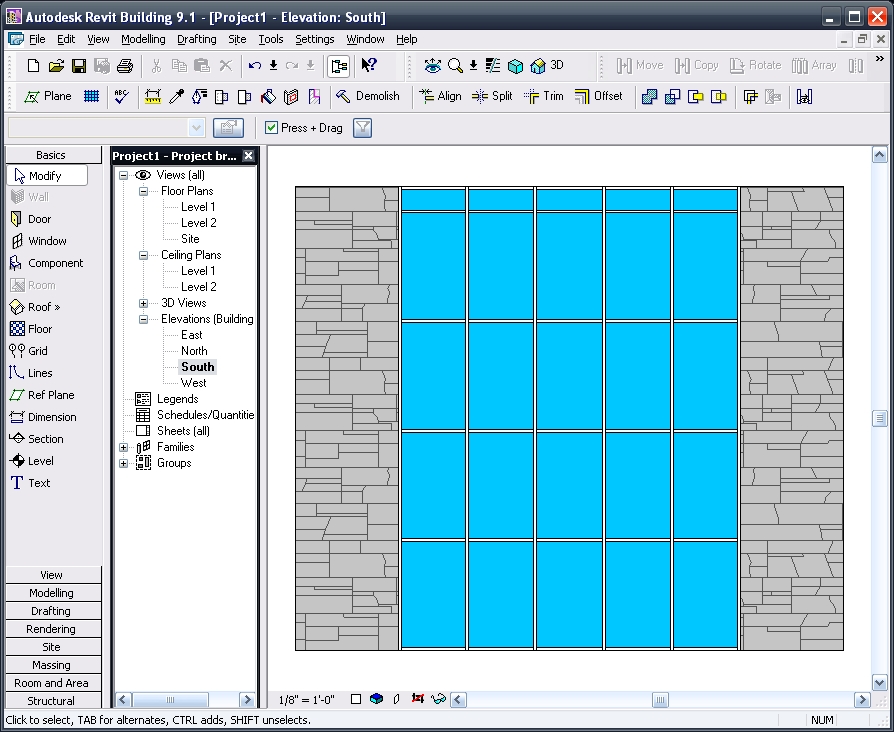
Revit. Views. Let's Go! The following Simple Elevations are just a few rough images to illustrate some of the things we can do with Views in Revit...Just think how amazing they can look with an actual project!!!

I have heard asked (and have been asked myself) ..."how can I see through my windows in an elevation view?" It may seem simple for those who know but if we don't k
now that we don't know, that is where our pain can begin. Well Pain (with this) No More.

When in a 3D view goto
: view / orient / to other view then just choose the appropriate elevation (or section, etc.) view you wish to reorient to and there you'll have it; an "elevation" with transparent materials (that you can actually see through) what a concept, huh. Plus you get a whole new world of possibilities and new creative and illustrative options to explore...just remember to go back to: view / orient / save view to both save this new 'elevation' view and get a new default 3D view through the process of that save.

First: A Standard Elevation View:
Second: A 'Re-Oriented' 3D View with Shading W/ Edge graphics:
Third: That Re-Oriented View now
rendered out to an image:

Finally: The new image inserted onto a sheet and composited (overlaid) with another Wire Frame view (actually a duplicate of the initial view used to render): Yes we can do that!!!
Have a great time and let me hear from you if you have any comments or questions!!!

-J


Read More
Posted in | No comments
Newer Posts Older Posts Home
Subscribe to: Posts (Atom)

Popular Posts

  • ____(1)fest 2009
    ____ing (2) in a ____ (3)can? Better than that!!! First off to Virginia Gardiner, the Designer of the Loowatt, I apologize for the low-brow ...
  • Do You Want To Be An Architect?
    Sage advice that is spot on. Too bad the damned video isn't shown in Architecture Schools (or earlier)!!!
  • Slanted Volumes...I guess the Ramp tool isn't enough?
    I've been asked several times in the past few months to create (or show others how to create) Parametric Slanted Volumes. It seems that...
  • Central File Transfer Processes
    Whether transferring to others or even working from home (see the BONUS!!! section) Central files need extra attention paid when dealing wit...
  • RTC USA Me Part 2: A+Revit Families
    This time the presentation is first & the handout after... Only one may be needed, as they are mainly the same... you decide though... C...
  • Fun With Revit & Cows
    Here's a bit of fun with Marcello's Cow for LARUG (Hey, check out LARUG's Group Site and sign up/join if you want to come to ...
  • MythBusted? BIM/CAD is no panacea for lacking experience
    Images from the Gommateshvara Statue I visited yesterday... and some of those 650 steps that I am about to mention (yikes on the calf muscl...
  • Namaste From India (not na)
    5:00 am, India time... do you know where your J is? So after the 20 some odd hours of flying time, I am finally here in Bangalore; the Silic...
  • Scope Boxes Redux
    Looking for some guidance on how to use scope boxes? Wondering just what you can use them for? Thought so...Here is one way to use them to g...
  • Revit Users and You (Sirs?)
    An excerpt from an Evite for the Los Angeles Revit Users Group meeting for July : (yes, click the link if you'd like to be invited...ju...

Categories

  • Addons
  • AEC
  • angled
  • Architecture
  • Arrays
  • AU
  • AUGI
  • Autodesk
  • Autodesk University
  • BIM
  • calculated values
  • Content
  • dirty
  • DWF
  • Elevations
  • Engineering
  • Error Reporting
  • Errors
  • Extensions
  • family
  • Family Types
  • File Locations
  • Filters
  • fire rated
  • fire rating filters revit
  • Fire Ratings
  • formula
  • formulas
  • Future
  • Graphic Overrides
  • graphics
  • Happy New Year
  • Helix
  • Hide at Scales Coarser Than
  • inconsistent units
  • Las Vegas
  • marketing
  • MEP
  • model
  • Multiple Page PDF from Revit
  • New Features Workshop
  • no one said to model a cow
  • object overrides
  • Overrides
  • Parameters
  • PDF
  • Ramp
  • Revit
  • Revit 2009 New Features Workshop
  • Revit 2010
  • Revit Architecture 2009 New Features Workshop
  • Revit Crash
  • Revit Families
  • Revit filters
  • revit formulas
  • Revit Web Update
  • Revitisms
  • scale
  • section
  • Shared Parameters
  • slanted
  • sloped
  • solids
  • Spiral
  • Spiral Ramp
  • Spiral Stairs
  • Structure
  • Think Twice and Place Once
  • Tools
  • Use Revit Like Revit
  • view
  • Views
  • volumes

Blog Archive

  • ►  2013 (17)
    • ►  October (2)
    • ►  August (1)
    • ►  July (1)
    • ►  June (2)
    • ►  May (2)
    • ►  April (2)
    • ►  March (3)
    • ►  February (3)
    • ►  January (1)
  • ►  2012 (24)
    • ►  December (2)
    • ►  November (1)
    • ►  October (2)
    • ►  September (2)
    • ►  August (2)
    • ►  July (1)
    • ►  May (3)
    • ►  April (1)
    • ►  March (3)
    • ►  February (3)
    • ►  January (4)
  • ►  2011 (55)
    • ►  December (8)
    • ►  November (4)
    • ►  October (3)
    • ►  September (1)
    • ►  August (3)
    • ►  July (4)
    • ►  June (3)
    • ►  May (8)
    • ►  April (3)
    • ►  March (7)
    • ►  February (9)
    • ►  January (2)
  • ►  2010 (55)
    • ►  December (7)
    • ►  November (5)
    • ►  October (4)
    • ►  September (4)
    • ►  August (4)
    • ►  July (6)
    • ►  June (4)
    • ►  May (7)
    • ►  April (3)
    • ►  March (2)
    • ►  February (3)
    • ►  January (6)
  • ►  2009 (68)
    • ►  December (6)
    • ►  November (3)
    • ►  October (6)
    • ►  September (5)
    • ►  August (8)
    • ►  July (13)
    • ►  June (13)
    • ►  May (2)
    • ►  April (6)
    • ►  March (4)
    • ►  February (1)
    • ►  January (1)
  • ►  2008 (27)
    • ►  November (2)
    • ►  October (1)
    • ►  September (1)
    • ►  August (1)
    • ►  July (5)
    • ►  June (2)
    • ►  May (4)
    • ►  April (3)
    • ►  March (2)
    • ►  February (5)
    • ►  January (1)
  • ►  2007 (39)
    • ►  December (4)
    • ►  November (4)
    • ►  October (5)
    • ►  September (1)
    • ►  August (4)
    • ►  July (6)
    • ►  June (3)
    • ►  May (5)
    • ►  April (2)
    • ►  March (4)
    • ►  February (1)
  • ▼  2006 (14)
    • ▼  December (2)
      • Multiple Page PDF's from Revit 9.1? Help says No b...
      • Choose Your Views 1: Open Your Mind To The Possible
    • ►  November (1)
    • ►  October (2)
    • ►  September (5)
    • ►  August (4)
Powered by Blogger.

About Me

Unknown
View my complete profile