Old PC Deals

  • Subscribe to our RSS feed.
  • Twitter
  • StumbleUpon
  • Reddit
  • Facebook
  • Digg

Monday, 25 September 2006

DGN Converter and More!!! Labs Rule!!!

Posted on 10:05 by Unknown
A former colleague of mine (Happy 10 years Mr. S. How does this make you feel???) has (had?) the need to convert multiple files from .DGN to .DWG. For one thing meaning he must start to use his left hand again!!! -To work!!! For another there was a need to interface back and forth between ACAD and Microstation based applications.

I add that "left hand" comment because I found that Microstation is (was) a click-happy software that doesn't leverage (or even allow for the most part) the use of the left hand; if you are a right handed person, of course. (Hey Bentley, not only do many of us have 2 hands but we have this new thing: it's called a keyboard.) For all the lefties out here the converse would be the case, but I digress.

While checking over my links, I found that Autodesk Labs has a DGN/DWG converter!!! So if you are in need of such file conversions between DWG/DGN then just click on the picture of the Labradors below...It will bring you to the Autodesk Labs site; you can download it from there.

Take care,

-JPhoto: http://www.dogbreedinfo.com/labrador.htm

Read More
Posted in | No comments

Saturday, 23 September 2006

Dimensions: Prefix to Suffix Without a "Text Override"!!!

Posted on 12:47 by Unknown

Well Hello Again,
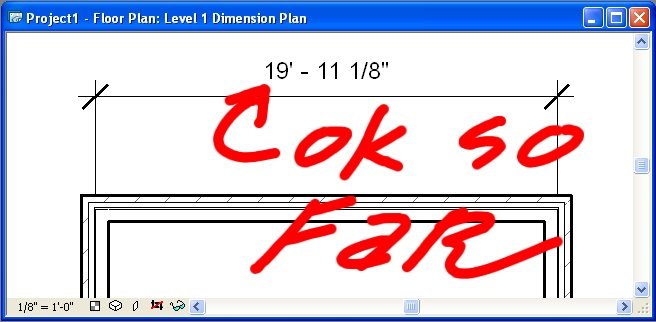
As I ponder the difficulties that CAD World users enjoy and the growing advantages of BIM Town that others enjoy; I am again reminded of the ridiculous ability (my personal opinion, please don't be offended if you're "That CAD Person") to override a dimension with a 'fake' number. Now I know dimension overrides can be used to call something out for verification, etc. and I know too that we used them in the Prehistoric Hand Drafting times because we either didn't draw correctly, we didn't want to RE-draw something for just a few inches (or less), or we didn't want to take the liability on, etc.

(If you have arguments to why dimension text overrides should be used feel free to comment or email me but I bet I have an answer for each). BTW: A text overridden dimension is called a note, so why not use a note?

I will give you CAD Users one thing: Using only words in a text override can be useful and in my opinion can be benign, so you have my permission to use them: but you don't have my permission to fake in a number...That's why in all ACAD based products there is the command "DIMREASSOC". -Yeah, it re-associates all text overridden dimensions!!!

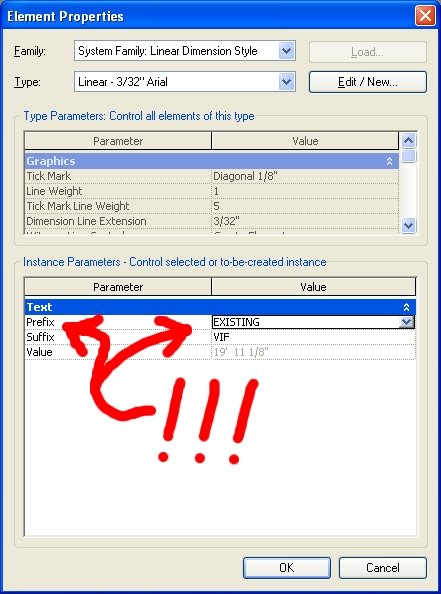
Down to the point: Revit has pure Suffix and Prefix properties that can be added to a real dimension. If you want the wall's dimension to report a 'pretty', round number then: "Move the Wall (.)" I stress the "period" in that sentence! No. I don't even feel we should clip the dimension tolerance. To me we should be in-putting our geometry, models, etc correctly(.) Anything less is asking for problems; not to mention incorrect and sloppy.

So: If you want a Prefix or Suffix in Revit then select the dimension in question.

Then hit the 'Properties' button, on the 'Options Bar' and you'll see something like the following:

Enter the information you need and OK yourself all the way out. And yes, you will be OK!!!

Architectural Desktop & CAD World have these prefix and suffix "Options" and they are fantastic upgrades over the programming text we used to use; but one can still fake in the dimensions. Yeah, I know it may be your "CAD" standard to allow this but it is incorrect, limiting and in my opinion one of the worst things we can do: frankly it degrades Architects' standing in the industry with engineers, consultants, etc. as this is technically "incorrect information" being provided (except of course for the purely textual 'text overrides'. (I keep hearing from all sorts of people in the industry who laugh that Architects don't know what they are doing based on these bogus dimensions!!!).

That's all I have for now, so Happy CADding and Better BIMming,
-J
Read More
Posted in | No comments

Saturday, 16 September 2006

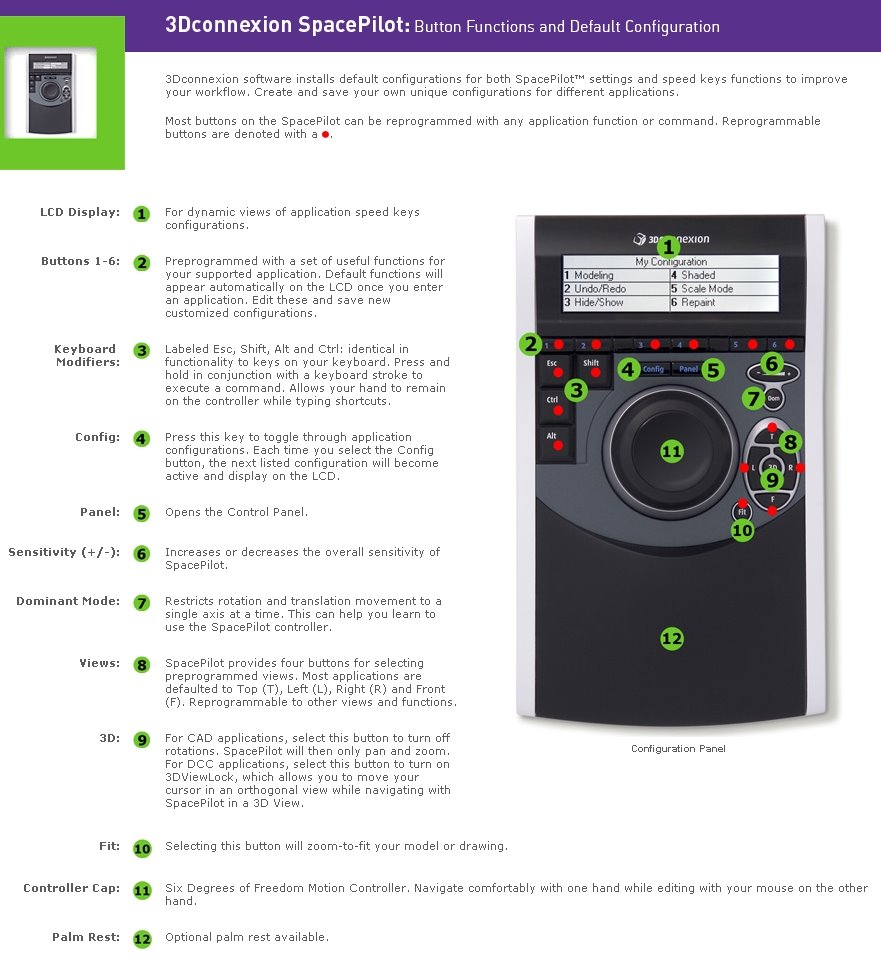
3D CONNEXION's SpacePilot: Now we're flying!!!

Posted on 21:54 by Unknown
I am adding this prequel (12/14/2010) to let you know you keep your eyes out for a blog posting that will be coming in the near future regarding SpacePilots and all the other 3D Connexion Space-devices and... well, I can't say right now...


Well My hat is off to the folks at 3D Connexion for creating some of the coolest (not to mention useful) input augmentation digital manipulation tools, perhaps since the mouse (although I don't recommend the use of a mouse; I prefer a pen tablet for my main input device for "real" work. ...You know what 'they' say: OK, well maybe just I say it: "the pen 'tablet' is mightier than the mouse." -Plus with the tablet & SpacePilot I don't have to worry about getting carpal tunnel syndrome from dirty little rodents). Come-on, you know the mouse is always getting dirty...and they can f+*# up your carpals...

I have used my new
SpacePilot for just 2 days but am already loving both the 3D & 2D computer life a little more because of it; plus I find myself reinvigorated; although that may be due to the fact that I live near the beach and USC won again...I'm not sure.

Well, back to the point of this post...
Pan, zoom, rotate, up/down, in out, etc. they are all dynamically modified, at any time (!!!), without having to enter into a command. (WOW). Additionally, all of their products have a multitude of programmable buttons; which is always needed (well, at least by me). It even saves custom setups that can be distinct for different softwares. Included in these are some presets for Maya, 3D MAX, VIZ, Inventor, Autocad, (thus Architectural Desktop and all the other Autocad based products) and hosts of other, sometimes surprising (in a good way) supported applications... Including PhotoShop, Acrobat, Outlook, etc., etc.

A collegue of mine uses the SpaceTraveler, which is really slick, being that it is so portable while being extremely functional. Being that he is the Mechanical Maniac, he finds it invaluable. (Shoot, should I have one of those too??? I believe that will have to happen for me). The Traveler was the first of these products that I both saw and got a chance to try: and I fell in love (with the whole line of the SpaceProducts immediately), after my first time (using one).


Though the pan and zoom aspects of the SpacePilot works in Revit, there is one limitation, at least for me personally, at this time and that is it isn't fully supported for use within Revit. (No dynamic rotate or any programmability yet). I believe this will
soon be accomplished and it will become fully functional within Revit and when that day comes I will most assuredly update this Blog with that info!!!

So if you like to save time and would enjoy having greater and smoother control over the manipulating of your 3D & 2D Models, data, computer applications and environments like I do then definitely look into getting one of these great products...at least one!!!

-J
Read More
Posted in | No comments

Friday, 15 September 2006

The Hollywood Guilds Demo

Posted on 16:02 by Unknown

Hello Guild Members,
I am preparing a Demonstration for you showing Revit Building to illustrate how this technology can help streamline the Set Design Process, Pre-Visualization & Production of deliverables for you and your industry.

Please click either the "Revit in Hollywood" image above or the "Comments" link at the bottom of this post and add any requests, comments or questions you may have about this and I will either reply herein or include those ideas, examples in my demo. The demo will be scheduled to happen in the next few months.


After reviewing examples of typical, time sensitive projects required in your industry I am confident that you can realize, with the use of Revit, more design flexibility; more team input and continual production brainstorming and on the fly revisions, changes & options than can be achieved with either traditional hand drafting workflows or other not fully parametric, and/or line-based cad solutions.

By leveraging Revit's parametric change engine (how Revit works) one can have ultimate flexibility throughout the entire life of a project while maintaining a set of deliverables that not only
can be built from but are actually (and always) coordinated. -the only way I can have an uncoordinated set of working drawings is by not printing!!! (-Well I could forget to give updated prints to the builders, but that is another matter entirely!!!)

Change something once and it changes everywhere. Immediately, everywhere.
Revit: REvise+InsTantly. -That is actually where the name came from, I am told.

I look forward to hearing from you,
-J
Read More
Posted in | No comments

Tuesday, 12 September 2006

Publish 3D DWG's to Google Earth

Posted on 13:00 by Unknown
Do you want to Publish your 3D .DWG's to Google Earth?

Well, yes as a matter of fact I do!!!

It's finally here and easy enough to use. There is an early Beta version available from the Autodesk Labs site: Click Here!!!

There are also application/addons to Revit Building that can accomplish this as well (obviously in Revit) so I will post more info regarding that one in the next couple of days. I will also post some of my examples, but for now I thought you (all) should know!!!

-J
Read More
Posted in | No comments
Newer Posts Older Posts Home
Subscribe to: Posts (Atom)

Popular Posts

  • 1 Sure Way To Get What You Want ;-)
    Last 2 days 2 Vote @ JayZallan to the #AUGI Board bit.ly/rFoQu2 else @ davewlight will send around the boys to get U #SavagedByKittens —...
  • CAD FILES IN REVIT: ON OR OFF THIS VIEW OR THAT
    Well I must set my views on BAD CAD data aside because sometimes we need to use CAD files in our Revit projects Especially for Site Plans. H...
  • Make Them Detail Components: A How-To
    Recently I got a complement/comment posted to an older blog entry “ Converting CAD Details To Revit Details: Just Do It...One way or another...
  • More Fun With Views: Stacked Isometrics and More
    A friend asked me how I made stacked 3D Plan Views in a project I was showing him; so I offer this up for everyone (who sees it) to use and...
  • RTC USA Me Part 2: A+Revit Families
    This time the presentation is first & the handout after... Only one may be needed, as they are mainly the same... you decide though... C...
  • ____(1)fest 2009
    ____ing (2) in a ____ (3)can? Better than that!!! First off to Virginia Gardiner, the Designer of the Loowatt, I apologize for the low-brow ...
  • Do You Want To Be An Architect?
    Sage advice that is spot on. Too bad the damned video isn't shown in Architecture Schools (or earlier)!!!
  • Time for a change of direction: The Z Direction!!!
    Holograms... "to all my friends" OK, I recently met with some dynamic BIM folks at Suffolk Construction and we discussed all thi...
  • Central File Transfer Processes
    Whether transferring to others or even working from home (see the BONUS!!! section) Central files need extra attention paid when dealing wit...
  • 3D Grids In Revit | An Oldie But Goodie Done Again
    So I need (or want :-) to use a Grid represented in 3D in Revit and while Navisworks can now visualize the levels and grids in 3D, alas Revi...

Categories

  • Addons
  • AEC
  • angled
  • Architecture
  • Arrays
  • AU
  • AUGI
  • Autodesk
  • Autodesk University
  • BIM
  • calculated values
  • Content
  • dirty
  • DWF
  • Elevations
  • Engineering
  • Error Reporting
  • Errors
  • Extensions
  • family
  • Family Types
  • File Locations
  • Filters
  • fire rated
  • fire rating filters revit
  • Fire Ratings
  • formula
  • formulas
  • Future
  • Graphic Overrides
  • graphics
  • Happy New Year
  • Helix
  • Hide at Scales Coarser Than
  • inconsistent units
  • Las Vegas
  • marketing
  • MEP
  • model
  • Multiple Page PDF from Revit
  • New Features Workshop
  • no one said to model a cow
  • object overrides
  • Overrides
  • Parameters
  • PDF
  • Ramp
  • Revit
  • Revit 2009 New Features Workshop
  • Revit 2010
  • Revit Architecture 2009 New Features Workshop
  • Revit Crash
  • Revit Families
  • Revit filters
  • revit formulas
  • Revit Web Update
  • Revitisms
  • scale
  • section
  • Shared Parameters
  • slanted
  • sloped
  • solids
  • Spiral
  • Spiral Ramp
  • Spiral Stairs
  • Structure
  • Think Twice and Place Once
  • Tools
  • Use Revit Like Revit
  • view
  • Views
  • volumes

Blog Archive

  • ►  2013 (17)
    • ►  October (2)
    • ►  August (1)
    • ►  July (1)
    • ►  June (2)
    • ►  May (2)
    • ►  April (2)
    • ►  March (3)
    • ►  February (3)
    • ►  January (1)
  • ►  2012 (24)
    • ►  December (2)
    • ►  November (1)
    • ►  October (2)
    • ►  September (2)
    • ►  August (2)
    • ►  July (1)
    • ►  May (3)
    • ►  April (1)
    • ►  March (3)
    • ►  February (3)
    • ►  January (4)
  • ►  2011 (55)
    • ►  December (8)
    • ►  November (4)
    • ►  October (3)
    • ►  September (1)
    • ►  August (3)
    • ►  July (4)
    • ►  June (3)
    • ►  May (8)
    • ►  April (3)
    • ►  March (7)
    • ►  February (9)
    • ►  January (2)
  • ►  2010 (55)
    • ►  December (7)
    • ►  November (5)
    • ►  October (4)
    • ►  September (4)
    • ►  August (4)
    • ►  July (6)
    • ►  June (4)
    • ►  May (7)
    • ►  April (3)
    • ►  March (2)
    • ►  February (3)
    • ►  January (6)
  • ►  2009 (68)
    • ►  December (6)
    • ►  November (3)
    • ►  October (6)
    • ►  September (5)
    • ►  August (8)
    • ►  July (13)
    • ►  June (13)
    • ►  May (2)
    • ►  April (6)
    • ►  March (4)
    • ►  February (1)
    • ►  January (1)
  • ►  2008 (27)
    • ►  November (2)
    • ►  October (1)
    • ►  September (1)
    • ►  August (1)
    • ►  July (5)
    • ►  June (2)
    • ►  May (4)
    • ►  April (3)
    • ►  March (2)
    • ►  February (5)
    • ►  January (1)
  • ►  2007 (39)
    • ►  December (4)
    • ►  November (4)
    • ►  October (5)
    • ►  September (1)
    • ►  August (4)
    • ►  July (6)
    • ►  June (3)
    • ►  May (5)
    • ►  April (2)
    • ►  March (4)
    • ►  February (1)
  • ▼  2006 (14)
    • ►  December (2)
    • ►  November (1)
    • ►  October (2)
    • ▼  September (5)
      • DGN Converter and More!!! Labs Rule!!!
      • Dimensions: Prefix to Suffix Without a "Text Overr...
      • 3D CONNEXION's SpacePilot: Now we're flying!!!
      • The Hollywood Guilds Demo
      • Publish 3D DWG's to Google Earth
    • ►  August (4)
Powered by Blogger.

About Me

Unknown
View my complete profile