Old PC Deals

  • Subscribe to our RSS feed.
  • Twitter
  • StumbleUpon
  • Reddit
  • Facebook
  • Digg

Monday, 11 December 2006

Choose Your Views 1: Open Your Mind To The Possible

Posted on 23:25 by Unknown
Well we're back and AU was...well...it was in Vegas so let's leave it at that.
Revit. Views. Let's Go! The following Simple Elevations are just a few rough images to illustrate some of the things we can do with Views in Revit...Just think how amazing they can look with an actual project!!!

I have heard asked (and have been asked myself) ..."how can I see through my windows in an elevation view?" It may seem simple for those who know but if we don't k
now that we don't know, that is where our pain can begin. Well Pain (with this) No More.

When in a 3D view goto
: view / orient / to other view then just choose the appropriate elevation (or section, etc.) view you wish to reorient to and there you'll have it; an "elevation" with transparent materials (that you can actually see through) what a concept, huh. Plus you get a whole new world of possibilities and new creative and illustrative options to explore...just remember to go back to: view / orient / save view to both save this new 'elevation' view and get a new default 3D view through the process of that save.

First: A Standard Elevation View:
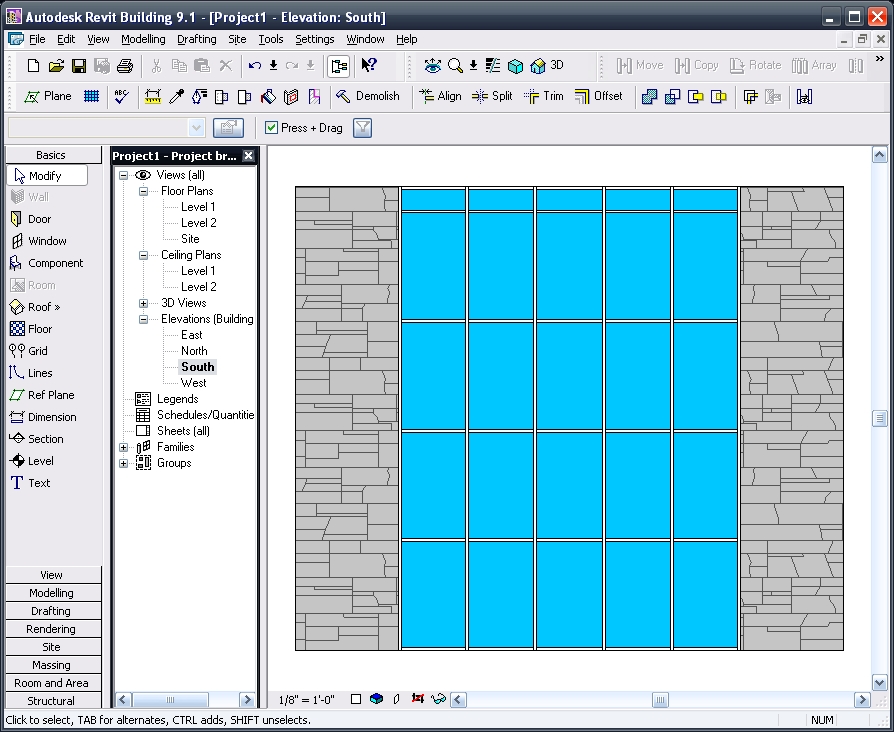
Second: A 'Re-Oriented' 3D View with Shading W/ Edge graphics:
Third: That Re-Oriented View now
rendered out to an image:

Finally: The new image inserted onto a sheet and composited (overlaid) with another Wire Frame view (actually a duplicate of the initial view used to render): Yes we can do that!!!
Have a great time and let me hear from you if you have any comments or questions!!!

-J


Email ThisBlogThis!Share to XShare to Facebook
Posted in | No comments
Newer Post Older Post Home

0 comments:

Post a Comment

Subscribe to: Post Comments (Atom)

Popular Posts

  • Do You Want To Be An Architect?
    Sage advice that is spot on. Too bad the damned video isn't shown in Architecture Schools (or earlier)!!!
  • ____(1)fest 2009
    ____ing (2) in a ____ (3)can? Better than that!!! First off to Virginia Gardiner, the Designer of the Loowatt, I apologize for the low-brow ...
  • Central File Transfer Processes
    Whether transferring to others or even working from home (see the BONUS!!! section) Central files need extra attention paid when dealing wit...
  • RTC USA Me Part 2: A+Revit Families
    This time the presentation is first & the handout after... Only one may be needed, as they are mainly the same... you decide though... C...
  • Fun With Revit & Cows
    Here's a bit of fun with Marcello's Cow for LARUG (Hey, check out LARUG's Group Site and sign up/join if you want to come to ...
  • MythBusted? BIM/CAD is no panacea for lacking experience
    Images from the Gommateshvara Statue I visited yesterday... and some of those 650 steps that I am about to mention (yikes on the calf muscl...
  • Namaste From India (not na)
    5:00 am, India time... do you know where your J is? So after the 20 some odd hours of flying time, I am finally here in Bangalore; the Silic...
  • Slanted Volumes...I guess the Ramp tool isn't enough?
    I've been asked several times in the past few months to create (or show others how to create) Parametric Slanted Volumes. It seems that...
  • Scope Boxes Redux
    Looking for some guidance on how to use scope boxes? Wondering just what you can use them for? Thought so...Here is one way to use them to g...
  • Revit Users and You (Sirs?)
    An excerpt from an Evite for the Los Angeles Revit Users Group meeting for July : (yes, click the link if you'd like to be invited...ju...

Categories

  • Addons
  • AEC
  • angled
  • Architecture
  • Arrays
  • AU
  • AUGI
  • Autodesk
  • Autodesk University
  • BIM
  • calculated values
  • Content
  • dirty
  • DWF
  • Elevations
  • Engineering
  • Error Reporting
  • Errors
  • Extensions
  • family
  • Family Types
  • File Locations
  • Filters
  • fire rated
  • fire rating filters revit
  • Fire Ratings
  • formula
  • formulas
  • Future
  • Graphic Overrides
  • graphics
  • Happy New Year
  • Helix
  • Hide at Scales Coarser Than
  • inconsistent units
  • Las Vegas
  • marketing
  • MEP
  • model
  • Multiple Page PDF from Revit
  • New Features Workshop
  • no one said to model a cow
  • object overrides
  • Overrides
  • Parameters
  • PDF
  • Ramp
  • Revit
  • Revit 2009 New Features Workshop
  • Revit 2010
  • Revit Architecture 2009 New Features Workshop
  • Revit Crash
  • Revit Families
  • Revit filters
  • revit formulas
  • Revit Web Update
  • Revitisms
  • scale
  • section
  • Shared Parameters
  • slanted
  • sloped
  • solids
  • Spiral
  • Spiral Ramp
  • Spiral Stairs
  • Structure
  • Think Twice and Place Once
  • Tools
  • Use Revit Like Revit
  • view
  • Views
  • volumes

Blog Archive

  • ►  2013 (17)
    • ►  October (2)
    • ►  August (1)
    • ►  July (1)
    • ►  June (2)
    • ►  May (2)
    • ►  April (2)
    • ►  March (3)
    • ►  February (3)
    • ►  January (1)
  • ►  2012 (24)
    • ►  December (2)
    • ►  November (1)
    • ►  October (2)
    • ►  September (2)
    • ►  August (2)
    • ►  July (1)
    • ►  May (3)
    • ►  April (1)
    • ►  March (3)
    • ►  February (3)
    • ►  January (4)
  • ►  2011 (55)
    • ►  December (8)
    • ►  November (4)
    • ►  October (3)
    • ►  September (1)
    • ►  August (3)
    • ►  July (4)
    • ►  June (3)
    • ►  May (8)
    • ►  April (3)
    • ►  March (7)
    • ►  February (9)
    • ►  January (2)
  • ►  2010 (55)
    • ►  December (7)
    • ►  November (5)
    • ►  October (4)
    • ►  September (4)
    • ►  August (4)
    • ►  July (6)
    • ►  June (4)
    • ►  May (7)
    • ►  April (3)
    • ►  March (2)
    • ►  February (3)
    • ►  January (6)
  • ►  2009 (68)
    • ►  December (6)
    • ►  November (3)
    • ►  October (6)
    • ►  September (5)
    • ►  August (8)
    • ►  July (13)
    • ►  June (13)
    • ►  May (2)
    • ►  April (6)
    • ►  March (4)
    • ►  February (1)
    • ►  January (1)
  • ►  2008 (27)
    • ►  November (2)
    • ►  October (1)
    • ►  September (1)
    • ►  August (1)
    • ►  July (5)
    • ►  June (2)
    • ►  May (4)
    • ►  April (3)
    • ►  March (2)
    • ►  February (5)
    • ►  January (1)
  • ►  2007 (39)
    • ►  December (4)
    • ►  November (4)
    • ►  October (5)
    • ►  September (1)
    • ►  August (4)
    • ►  July (6)
    • ►  June (3)
    • ►  May (5)
    • ►  April (2)
    • ►  March (4)
    • ►  February (1)
  • ▼  2006 (14)
    • ▼  December (2)
      • Multiple Page PDF's from Revit 9.1? Help says No b...
      • Choose Your Views 1: Open Your Mind To The Possible
    • ►  November (1)
    • ►  October (2)
    • ►  September (5)
    • ►  August (4)
Powered by Blogger.

About Me

Unknown
View my complete profile