Old PC Deals

  • Subscribe to our RSS feed.
  • Twitter
  • StumbleUpon
  • Reddit
  • Facebook
  • Digg

Monday, 2 October 2006

Door Tags by Room Number: "Want 'em?" Got 'em"

Posted on 22:38 by Unknown
A client of mine needed to have Door Tags be numbered by the room they were in...100A, 100B...etc. so herein is a solution to accomplish that quite successfully in Revit. But first...

In CADworld with it's non or semi intellegent lines, blocks, classes, property set definitions, etc. tagging items non-numerically was the norm for some of us and since we had to (some still have
to) use (now in my opinion, waste) that time (sometimes days) creating Schedules in their CAD based projects. Again, those are really lost hours manually inputting text into schedules or creating data sets to the 'enth degree'; yet it's mandatory in the CAD packages I know of (sorry ADT, you too). Well...Not in Revit!!!

Firstly, in Revit I actually like to simply allow doors be numbered as they will be; thus not making extra "busy" work that doesn't necessarily impact the Architecture in a positive way (That is why I am here, right? the Architecture?! oh yeah I remember) -Although, I have a dirty little secret: I too renumbered my doors in the past, based on levels (100's, 200's etc.) but am doing well in my CAD Standards Therapy sessions and I'm coming up on my One Year of CADsobriety soon!!!

As i said previously: here's a solution for you to get that particular door-numbering-by-room standard put into Revit...where it will be coordinated; though you may have to help it along when adding new doors or removing others, etc. Also: Revit will try it's best to continue the numbering you last used so be aware of what you and Revit do...So finally:


Our first image is a sample project with Doors tagged and Rooms placed:
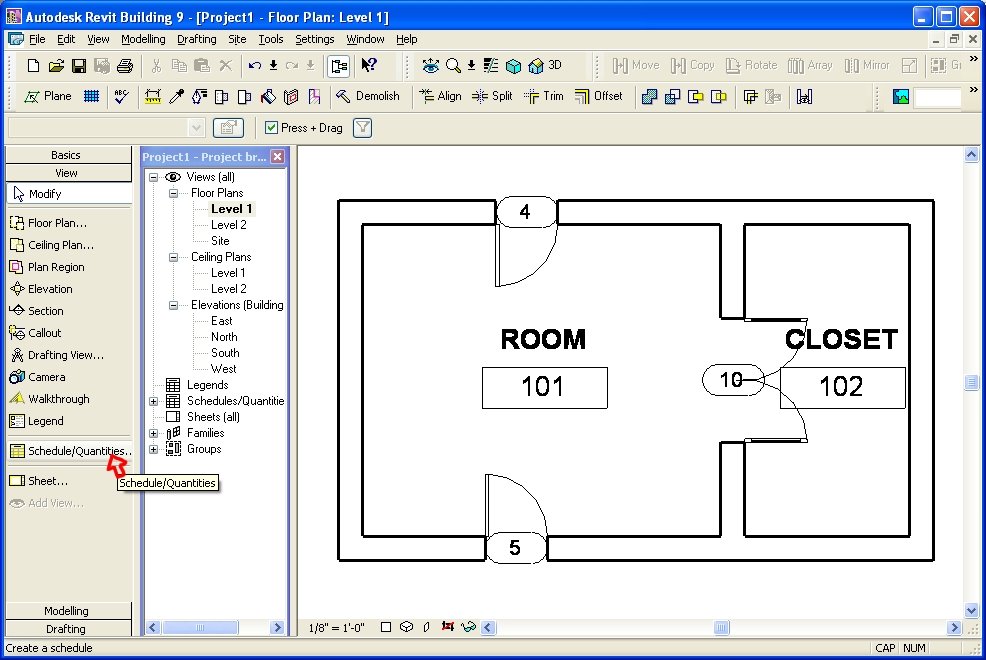
Now we are ready to create a Door Schedule View: Our next image illustrates the beginnings of such. Add fields as you need from the "Doors" Fields...reorder them as needed...
What we do now is: Be Curious...select the "From Room: Number" field.
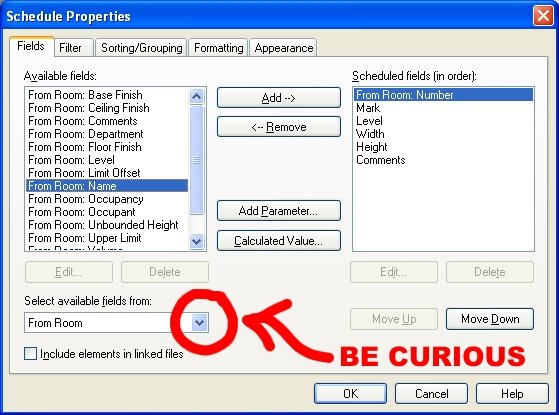
Then the "To Room: Number" field (Remember to re-order them as or if needed)

Now filter/sort/format and change the appearance settings if you need then complete the view...
Next, renumber the "Mark" fields in the newly created schedule, according to your preferences...
(Yes, this writes back to the actual door!!!)

But before we go there are a few "hidden" items...specifically "columns" that need hiding! Select the two 'Room ' columns, Right click and this is what you will see...yes choose to hide them!!!
After hiding these columns (yes, the schedule view can be right clicked at any time in the future, thus giving the choice to "show" them again, at any time...YEAH). Now we just need to place it all on a sheet and voila...Numbers by Rooms...Nearly automatic...And remember...we can do this once and save into our project templates and use it over and over!!!
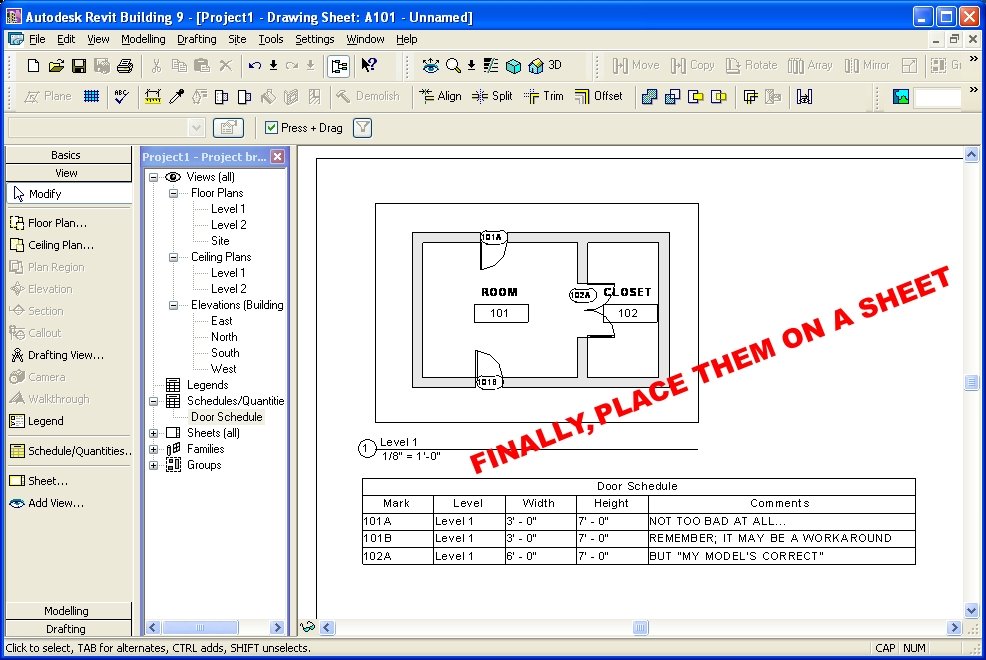
Take care!!! Thanks Daniel.
-J

Email ThisBlogThis!Share to XShare to Facebook
Posted in | No comments
Newer Post Older Post Home

0 comments:

Post a Comment

Subscribe to: Post Comments (Atom)

Popular Posts

  • Slanted Volumes...I guess the Ramp tool isn't enough?
    I've been asked several times in the past few months to create (or show others how to create) Parametric Slanted Volumes. It seems that...
  • Have You Been Overridden...Again?
    Yes I wish there was a Clear Overrides button that would give a list of all objects in a view that have been overridden, along with the obl...
  • (no title)
    This is mainly to help me remember the way to negate the "Inconsistent Units" error but I am sure there are more people who will f...
  • Nice comment, Thanks Tim
    A wholly unrelated image from Bangalore. Oh and... Tim said... (In regards to the post: Does being Green have a very un-Green cost to it? ...
  • OMFGLOL-VL: A Discourse on Emerging Tectonic Visualization and the Effects of Materiality on Praxis. Or an essay on the ridiculous way architects talk
    I was bumping about last night and while reading Doctor, Lawyer, Architect, Fail on the Architects 2Zebras site I hit the link for Witold ...
  • In Place Revit Family: The Floor
    Well, I have been asked to show a colleague how to create a metal deck floor. YAAY!!! First I asked the user (as you should ask yourself) if...
  • AU 2010 Results Now & Later
    Well, I am still shooting for 10 status but am glad to be a 9 :-) Great session and a great AU!!! Thanks to all who came by and participated...
  • Save to New File...
    I got this question from a colleague and thought it appropriate to post my reply herein... Q Does anyone know why the "Save to New File...
  • Spiral Ramps: a Helix of a Solution
    Before I begin to begin (added 06-11-2008), I seem to have found that Internet Explorer still sucks and will not show some of the graphics f...
  • Short Post, Huge Point!!! See the Comments too
    CAD-vs-BIM is all wrong!!! (but i'll keep the name for now). CAD is BIM and vice versa. More to follow... OK I'm back... Rise up. C...

Categories

  • Addons
  • AEC
  • angled
  • Architecture
  • Arrays
  • AU
  • AUGI
  • Autodesk
  • Autodesk University
  • BIM
  • calculated values
  • Content
  • dirty
  • DWF
  • Elevations
  • Engineering
  • Error Reporting
  • Errors
  • Extensions
  • family
  • Family Types
  • File Locations
  • Filters
  • fire rated
  • fire rating filters revit
  • Fire Ratings
  • formula
  • formulas
  • Future
  • Graphic Overrides
  • graphics
  • Happy New Year
  • Helix
  • Hide at Scales Coarser Than
  • inconsistent units
  • Las Vegas
  • marketing
  • MEP
  • model
  • Multiple Page PDF from Revit
  • New Features Workshop
  • no one said to model a cow
  • object overrides
  • Overrides
  • Parameters
  • PDF
  • Ramp
  • Revit
  • Revit 2009 New Features Workshop
  • Revit 2010
  • Revit Architecture 2009 New Features Workshop
  • Revit Crash
  • Revit Families
  • Revit filters
  • revit formulas
  • Revit Web Update
  • Revitisms
  • scale
  • section
  • Shared Parameters
  • slanted
  • sloped
  • solids
  • Spiral
  • Spiral Ramp
  • Spiral Stairs
  • Structure
  • Think Twice and Place Once
  • Tools
  • Use Revit Like Revit
  • view
  • Views
  • volumes

Blog Archive

  • ►  2013 (17)
    • ►  October (2)
    • ►  August (1)
    • ►  July (1)
    • ►  June (2)
    • ►  May (2)
    • ►  April (2)
    • ►  March (3)
    • ►  February (3)
    • ►  January (1)
  • ►  2012 (24)
    • ►  December (2)
    • ►  November (1)
    • ►  October (2)
    • ►  September (2)
    • ►  August (2)
    • ►  July (1)
    • ►  May (3)
    • ►  April (1)
    • ►  March (3)
    • ►  February (3)
    • ►  January (4)
  • ►  2011 (55)
    • ►  December (8)
    • ►  November (4)
    • ►  October (3)
    • ►  September (1)
    • ►  August (3)
    • ►  July (4)
    • ►  June (3)
    • ►  May (8)
    • ►  April (3)
    • ►  March (7)
    • ►  February (9)
    • ►  January (2)
  • ►  2010 (55)
    • ►  December (7)
    • ►  November (5)
    • ►  October (4)
    • ►  September (4)
    • ►  August (4)
    • ►  July (6)
    • ►  June (4)
    • ►  May (7)
    • ►  April (3)
    • ►  March (2)
    • ►  February (3)
    • ►  January (6)
  • ►  2009 (68)
    • ►  December (6)
    • ►  November (3)
    • ►  October (6)
    • ►  September (5)
    • ►  August (8)
    • ►  July (13)
    • ►  June (13)
    • ►  May (2)
    • ►  April (6)
    • ►  March (4)
    • ►  February (1)
    • ►  January (1)
  • ►  2008 (27)
    • ►  November (2)
    • ►  October (1)
    • ►  September (1)
    • ►  August (1)
    • ►  July (5)
    • ►  June (2)
    • ►  May (4)
    • ►  April (3)
    • ►  March (2)
    • ►  February (5)
    • ►  January (1)
  • ►  2007 (39)
    • ►  December (4)
    • ►  November (4)
    • ►  October (5)
    • ►  September (1)
    • ►  August (4)
    • ►  July (6)
    • ►  June (3)
    • ►  May (5)
    • ►  April (2)
    • ►  March (4)
    • ►  February (1)
  • ▼  2006 (14)
    • ►  December (2)
    • ►  November (1)
    • ▼  October (2)
      • Wall Component Thickness Not Sickness
      • Door Tags by Room Number: "Want 'em?" Got 'em"
    • ►  September (5)
    • ►  August (4)
Powered by Blogger.

About Me

Unknown
View my complete profile