Old PC Deals

  • Subscribe to our RSS feed.
  • Twitter
  • StumbleUpon
  • Reddit
  • Facebook
  • Digg

Saturday, 23 September 2006

Dimensions: Prefix to Suffix Without a "Text Override"!!!

Posted on 12:47 by Unknown

Well Hello Again,
As I ponder the difficulties that CAD World users enjoy and the growing advantages of BIM Town that others enjoy; I am again reminded of the ridiculous ability (my personal opinion, please don't be offended if you're "That CAD Person") to override a dimension with a 'fake' number. Now I know dimension overrides can be used to call something out for verification, etc. and I know too that we used them in the Prehistoric Hand Drafting times because we either didn't draw correctly, we didn't want to RE-draw something for just a few inches (or less), or we didn't want to take the liability on, etc.

(If you have arguments to why dimension text overrides should be used feel free to comment or email me but I bet I have an answer for each). BTW: A text overridden dimension is called a note, so why not use a note?

I will give you CAD Users one thing: Using only words in a text override can be useful and in my opinion can be benign, so you have my permission to use them: but you don't have my permission to fake in a number...That's why in all ACAD based products there is the command "DIMREASSOC". -Yeah, it re-associates all text overridden dimensions!!!

Down to the point: Revit has pure Suffix and Prefix properties that can be added to a real dimension. If you want the wall's dimension to report a 'pretty', round number then: "Move the Wall (.)" I stress the "period" in that sentence! No. I don't even feel we should clip the dimension tolerance. To me we should be in-putting our geometry, models, etc correctly(.) Anything less is asking for problems; not to mention incorrect and sloppy.

So: If you want a Prefix or Suffix in Revit then select the dimension in question.
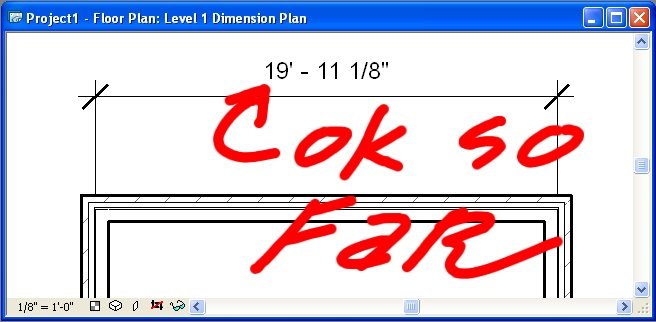
Then hit the 'Properties' button, on the 'Options Bar' and you'll see something like the following:
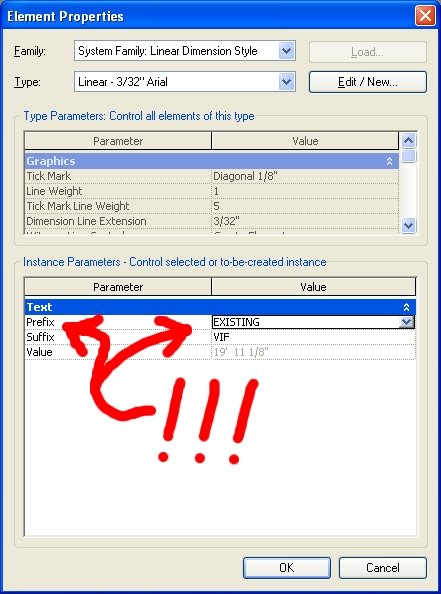
Enter the information you need and OK yourself all the way out. And yes, you will be OK!!!

Architectural Desktop & CAD World have these prefix and suffix "Options" and they are fantastic upgrades over the programming text we used to use; but one can still fake in the dimensions. Yeah, I know it may be your "CAD" standard to allow this but it is incorrect, limiting and in my opinion one of the worst things we can do: frankly it degrades Architects' standing in the industry with engineers, consultants, etc. as this is technically "incorrect information" being provided (except of course for the purely textual 'text overrides'. (I keep hearing from all sorts of people in the industry who laugh that Architects don't know what they are doing based on these bogus dimensions!!!).

That's all I have for now, so Happy CADding and Better BIMming,
-J
Email ThisBlogThis!Share to XShare to Facebook
Posted in | No comments
Newer Post Older Post Home

0 comments:

Post a Comment

Subscribe to: Post Comments (Atom)

Popular Posts

  • Slanted Volumes...I guess the Ramp tool isn't enough?
    I've been asked several times in the past few months to create (or show others how to create) Parametric Slanted Volumes. It seems that...
  • Have You Been Overridden...Again?
    Yes I wish there was a Clear Overrides button that would give a list of all objects in a view that have been overridden, along with the obl...
  • (no title)
    This is mainly to help me remember the way to negate the "Inconsistent Units" error but I am sure there are more people who will f...
  • Nice comment, Thanks Tim
    A wholly unrelated image from Bangalore. Oh and... Tim said... (In regards to the post: Does being Green have a very un-Green cost to it? ...
  • OMFGLOL-VL: A Discourse on Emerging Tectonic Visualization and the Effects of Materiality on Praxis. Or an essay on the ridiculous way architects talk
    I was bumping about last night and while reading Doctor, Lawyer, Architect, Fail on the Architects 2Zebras site I hit the link for Witold ...
  • In Place Revit Family: The Floor
    Well, I have been asked to show a colleague how to create a metal deck floor. YAAY!!! First I asked the user (as you should ask yourself) if...
  • AU 2010 Results Now & Later
    Well, I am still shooting for 10 status but am glad to be a 9 :-) Great session and a great AU!!! Thanks to all who came by and participated...
  • Save to New File...
    I got this question from a colleague and thought it appropriate to post my reply herein... Q Does anyone know why the "Save to New File...
  • Spiral Ramps: a Helix of a Solution
    Before I begin to begin (added 06-11-2008), I seem to have found that Internet Explorer still sucks and will not show some of the graphics f...
  • Short Post, Huge Point!!! See the Comments too
    CAD-vs-BIM is all wrong!!! (but i'll keep the name for now). CAD is BIM and vice versa. More to follow... OK I'm back... Rise up. C...

Categories

  • Addons
  • AEC
  • angled
  • Architecture
  • Arrays
  • AU
  • AUGI
  • Autodesk
  • Autodesk University
  • BIM
  • calculated values
  • Content
  • dirty
  • DWF
  • Elevations
  • Engineering
  • Error Reporting
  • Errors
  • Extensions
  • family
  • Family Types
  • File Locations
  • Filters
  • fire rated
  • fire rating filters revit
  • Fire Ratings
  • formula
  • formulas
  • Future
  • Graphic Overrides
  • graphics
  • Happy New Year
  • Helix
  • Hide at Scales Coarser Than
  • inconsistent units
  • Las Vegas
  • marketing
  • MEP
  • model
  • Multiple Page PDF from Revit
  • New Features Workshop
  • no one said to model a cow
  • object overrides
  • Overrides
  • Parameters
  • PDF
  • Ramp
  • Revit
  • Revit 2009 New Features Workshop
  • Revit 2010
  • Revit Architecture 2009 New Features Workshop
  • Revit Crash
  • Revit Families
  • Revit filters
  • revit formulas
  • Revit Web Update
  • Revitisms
  • scale
  • section
  • Shared Parameters
  • slanted
  • sloped
  • solids
  • Spiral
  • Spiral Ramp
  • Spiral Stairs
  • Structure
  • Think Twice and Place Once
  • Tools
  • Use Revit Like Revit
  • view
  • Views
  • volumes

Blog Archive

  • ►  2013 (17)
    • ►  October (2)
    • ►  August (1)
    • ►  July (1)
    • ►  June (2)
    • ►  May (2)
    • ►  April (2)
    • ►  March (3)
    • ►  February (3)
    • ►  January (1)
  • ►  2012 (24)
    • ►  December (2)
    • ►  November (1)
    • ►  October (2)
    • ►  September (2)
    • ►  August (2)
    • ►  July (1)
    • ►  May (3)
    • ►  April (1)
    • ►  March (3)
    • ►  February (3)
    • ►  January (4)
  • ►  2011 (55)
    • ►  December (8)
    • ►  November (4)
    • ►  October (3)
    • ►  September (1)
    • ►  August (3)
    • ►  July (4)
    • ►  June (3)
    • ►  May (8)
    • ►  April (3)
    • ►  March (7)
    • ►  February (9)
    • ►  January (2)
  • ►  2010 (55)
    • ►  December (7)
    • ►  November (5)
    • ►  October (4)
    • ►  September (4)
    • ►  August (4)
    • ►  July (6)
    • ►  June (4)
    • ►  May (7)
    • ►  April (3)
    • ►  March (2)
    • ►  February (3)
    • ►  January (6)
  • ►  2009 (68)
    • ►  December (6)
    • ►  November (3)
    • ►  October (6)
    • ►  September (5)
    • ►  August (8)
    • ►  July (13)
    • ►  June (13)
    • ►  May (2)
    • ►  April (6)
    • ►  March (4)
    • ►  February (1)
    • ►  January (1)
  • ►  2008 (27)
    • ►  November (2)
    • ►  October (1)
    • ►  September (1)
    • ►  August (1)
    • ►  July (5)
    • ►  June (2)
    • ►  May (4)
    • ►  April (3)
    • ►  March (2)
    • ►  February (5)
    • ►  January (1)
  • ►  2007 (39)
    • ►  December (4)
    • ►  November (4)
    • ►  October (5)
    • ►  September (1)
    • ►  August (4)
    • ►  July (6)
    • ►  June (3)
    • ►  May (5)
    • ►  April (2)
    • ►  March (4)
    • ►  February (1)
  • ▼  2006 (14)
    • ►  December (2)
    • ►  November (1)
    • ►  October (2)
    • ▼  September (5)
      • DGN Converter and More!!! Labs Rule!!!
      • Dimensions: Prefix to Suffix Without a "Text Overr...
      • 3D CONNEXION's SpacePilot: Now we're flying!!!
      • The Hollywood Guilds Demo
      • Publish 3D DWG's to Google Earth
    • ►  August (4)
Powered by Blogger.

About Me

Unknown
View my complete profile